Find Desktop UV DTF Printer for paper label and card printing
Source 30 Desktop UV DTF Printer models from verified suppliers in China. Compare specifications including print heads, resolution, and ink types for paper, label, and card applications.
Key considerations
Products List


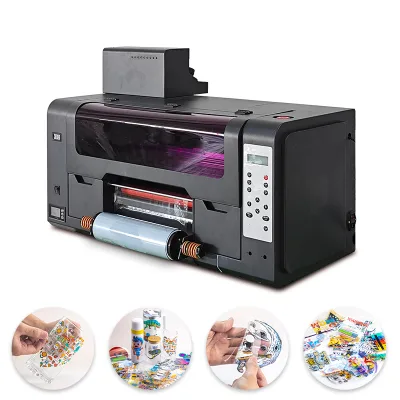
New A3 Size Flatbed Printer Digital UV Printer Mini Desktop Uv Dtf Printer Printing Machine
$2060.00 - $3530.00
MOQ: 1 Minimum


Dtf Printer 60cm Dtf Printer Printing Automatic Machine All in One Dtf Printer
$7746.00 - $7988.00
MOQ: 1 Pieces


Comprehensive Sourcing Guide
Strategic Sourcing Guide for Desktop UV DTF Printers
Understanding the Technical Landscape of Desktop UV DTF Solutions
When sourcing a desktop UV DTF (Direct to Film) printer, buyers must navigate a complex array of technical specifications that define the machine's capability, versatility, and output quality. The core keyword "Desktop UV DTF Printer" implies a compact, versatile unit designed for high-value, short-run production on diverse substrates. Based on the available market data, these machines are characterized by their ability to handle multiple printing interfaces, including 1000Base-T for networked environments and USB for direct local connections. This dual-interface capability ensures that the equipment can integrate seamlessly into both small workshop setups and larger, networked production floors.
The print head technology is a critical differentiator in this category. The observed market data indicates the use of advanced printheads such as the XP600, Dx8, and the newer I3200 models. The choice of printhead directly influences the resolution and print speed. For instance, configurations utilizing the I3200 printhead with a head quantity of four are designed to deliver high-resolution outputs, often reaching resolutions of 1080 DPI or even 720*2440 DPI in specific high-fidelity modes. The printing speed, observed at approximately 6.7 CPI (characters per inch) or 7.5 CPI in certain configurations, suggests a balance between throughput and quality that is typical for desktop units.
Ink consumption is another vital technical parameter. The data points to an ink usage rate of approximately 13-15ml per square meter, which is a standard benchmark for UV inkjet systems. The ink type is predominantly UV Neutral Ink or UV Soft Ink, which requires specific curing mechanisms. The color configuration is equally important; many units support a CMYK (Cyan, Magenta, Yellow, Black) setup augmented with White (W) and Varnish (V) channels. Some advanced configurations observed include up to six varnish channels, including Bronzing Varnish, allowing for complex texture and finish effects. The RIP software, such as Photoprint, Riin, or Maitop, is essential for managing color profiles and ensuring accurate reproduction of TIF, JPG, PDF, and PNG file formats.
Compliance, Certification, and Safety Standards
Procuring industrial printing equipment requires a rigorous approach to compliance and safety. While specific certification statuses for individual units in the market data are not explicitly listed, buyers must verify that the equipment adheres to international safety standards for electrical and mechanical operations. The voltage specifications observed in the market range from 110V to 220V at 50-60Hz, with a power consumption of approximately 850W. This variability necessitates that buyers confirm the specific voltage requirements of their local grid and ensure the machine includes the appropriate power conversion or plug configurations.
The physical dimensions and weight of the printer are critical for facility planning. The data presents a range of standard configurations, with package sizes varying from 846461 cm to 11610478 cm. Correspondingly, the gross weight ranges from 76kg to 130kg, with some standard configurations noted at 95kg. These figures indicate that while the machine is "desktop" in classification, it is a substantial piece of industrial equipment that requires a reinforced floor and adequate space for operation and maintenance. The "Air Draft Disions" mentioned in the data likely refer to ventilation requirements for the UV curing process, which is essential for managing fumes and heat.
Buyers should also verify the "Automatic Grade" of the machine. The market data shows a split between "Automatic" and "Semi-Automatic" grades. This distinction impacts the level of operator intervention required. Fully automatic models, such as those described with "Automatic Grade: Automatic," typically feature automated paper feeding and curing cycles, reducing labor costs and increasing consistency. Semi-automatic models may require manual loading or unloading steps. Furthermore, the "prod_standard" dimensions and weights vary significantly, suggesting that buyers must verify the specific standard compliance of the unit they are purchasing, as there is no single universal standard for these desktop units.
Cost Drivers and Economic Factors in Procurement
The total cost of ownership for a Desktop UV DTF Printer is influenced by several factors beyond the initial purchase price. The observed price range in the market is substantial, spanning from $880 to $7,988. This wide variance is driven by the complexity of the print head technology, the number of ink channels, the quality of the RIP software, and the build quality of the frame. A unit priced at the lower end of the spectrum may utilize older generation printheads or have a simpler mechanical structure, while a unit at the higher end likely features the latest I3200 heads, multi-varnish capabilities, and robust industrial-grade components.
Ink consumption rates, observed at 13-15ml per square meter, are a recurring operational cost. The type of ink used—whether UV Neutral or UV Soft—also affects long-term costs. UV inks generally have a longer shelf life and lower environmental impact compared to solvent-based inks, but the initial cost of the ink cartridges can be higher. Additionally, the "Printing Speed" of 6.7 CPI or 7.5 CPI directly impacts the cost per unit produced; faster speeds reduce the time cost per item but may require higher ink volumes or more frequent maintenance.
The "MOQ" (Minimum Order Quantity) for these machines is observed to be 1, indicating that buyers can procure single units without needing to commit to bulk orders. This flexibility is beneficial for small businesses and startups. However, the "Lead Time" and "Location" of the supplier, noted as "China," should be factored into the procurement timeline. Shipping large, heavy machinery from China involves logistics costs that can significantly impact the final price, especially given the gross weights ranging up to 130kg. Buyers should also consider the cost of spare parts, such as print heads and ink pumps, which are critical for maintaining uptime.
Typical Applications and Substrate Versatility
The versatility of desktop UV DTF printers makes them suitable for a wide range of applications. The "Usage" attributes observed in the market data include Paper Printer, Label Printer, Card Printer, Cloths Printer, and Tube Printer. This broad applicability stems from the "Universal Printer" classification and the ability to print on various surfaces. The "Structure" of the machine, described as a "Flat-Bed Cylinder Press," allows for printing on both flat and slightly curved objects, expanding the range of usable substrates.
For textile applications, the "Cloths Printer" designation highlights the machine's ability to print on fabrics, which is a growing market segment. The use of UV ink allows for durable, washable prints on cotton, polyester, and blended fabrics. In the packaging and labeling sector, the "Label Printer" and "Paper Printer" capabilities are essential for producing high-quality, short-run labels and packaging materials. The "Card Printer" function enables the creation of custom ID cards, business cards, and promotional cards with full-color graphics and protective varnish layers.
The "Photo Format/Type" support, including TIF, JPG, PDF, and PNG, ensures that the machine can handle a wide variety of design files, making it suitable for graphic design studios and print shops. The "Color" capabilities, such as CMYK+W+V, allow for the creation of vibrant, full-color images with white underbasing and special effects like varnish and bronzing. This versatility makes the Desktop UV DTF Printer a valuable asset for businesses looking to diversify their product offerings without investing in multiple specialized machines.
Supplier Evaluation and Quality Control Protocols
Evaluating suppliers for desktop UV DTF printers requires a systematic approach to ensure quality and reliability. The "Location" of the supplier, often noted as "China," suggests a need for thorough due diligence regarding the supplier's reputation, production capacity, and after-sales support. Buyers should verify the supplier's ability to provide technical documentation, including user manuals, safety data sheets, and maintenance guides. The "prod_model" and "prod_standard" details provided in the data should be cross-referenced with the supplier's actual product specifications to ensure accuracy.
Quality control is paramount in the printing industry. Buyers should request sample prints to evaluate the resolution, color accuracy, and ink adhesion. The "Resolution" specifications, such as 1080 DPI or 720*2440 DPI, should be verified through actual print tests. The "Print Head" quality, whether XP600, Dx8, or I3200, is a key indicator of print quality and longevity. Buyers should also inquire about the warranty terms and the availability of replacement parts. The "Automatic Grade" of the machine should be confirmed to ensure it meets the operational requirements of the buyer's workflow.
The "System Supported" by the printer, such as Windows XP, is another critical factor. Buyers must ensure that their existing IT infrastructure is compatible with the printer's software requirements. The "RIP Software" compatibility, including Photoprint, Riin, or Maitop, should be tested to ensure seamless integration with the buyer's design and production workflows. Additionally, the "Interface Type," whether USB or 1000Base-T, should be verified to ensure compatibility with the buyer's network and peripheral devices.
Long-Term Procurement and Operational Considerations
Long-term procurement of desktop UV DTF printers involves considering the total lifecycle of the equipment. The "Inkjet Type" and "Technics" of the machine, such as "Continuous Inkjet" or "Liquid Inkjet," influence the maintenance requirements and operational costs. Buyers should plan for regular maintenance schedules to prevent print head clogging and ensure consistent print quality. The "Air Draft" and ventilation requirements must be integrated into the facility design to maintain a safe working environment.
The "Supply Paper Mode" being "Automatic" is a significant advantage for high-volume production, reducing the need for manual intervention and minimizing the risk of human error. However, buyers should also consider the "Max. Paper Size" and "Printing Size" limitations, which are observed to range from 65cm to A3 formats. These dimensions dictate the maximum size of the products that can be printed, which may limit the scope of applications for some businesses.
Finally, the "Style" and "Color" options available in the market data suggest that buyers should consider the aesthetic and functional requirements of their specific applications. The ability to print in "Multi-Colour" and the availability of specialized inks like "UV Soft Ink" and "UV Neutral Ink" provide the flexibility needed to meet diverse customer demands. By carefully evaluating these long-term factors, buyers can make informed decisions that ensure the sustainability and profitability of their printing operations.
FAQs
What print head models are available for desktop uv dtf printers?
Available print head models include XP600, Dx8, and I3200 configurations. Some units utilize two EPS printheads while others feature four I3200 heads to achieve resolutions up to 2440 DPI.
Can these printers handle multiple printing interfaces like network and USB?
Yes, the machines support both 1000Base-T network interfaces and USB connections. This dual capability allows seamless integration into both local workshop setups and larger networked production environments.
What is the typical ink consumption rate for these UV printers?
The typical ink consumption is approximately 13 to 15 milliliters per square meter. This rate applies to systems using UV Neutral Ink or UV Soft Ink for various substrate applications.
Which color configurations are supported by these desktop printing units?
Supported color configurations include CMYK plus White and Varnish channels. Some advanced models offer up to six varnish channels, including bronzing varnish, for complex texture and finish effects.
What are the standard package dimensions and weight for these printers?
Package sizes typically range from 84 by 64 by 61 cm to 116 by 104 by 78 cm. Gross weights vary between 76 kg and 130 kg depending on the specific model configuration.
How does the automatic grade affect the operation of these printers?
The automatic grade determines the level of operator intervention required during production. Fully automatic models feature automated feeding and curing, while semi-automatic versions may need manual loading steps.