Source Android E Paper Display for retail store, shopping mall, supermarket
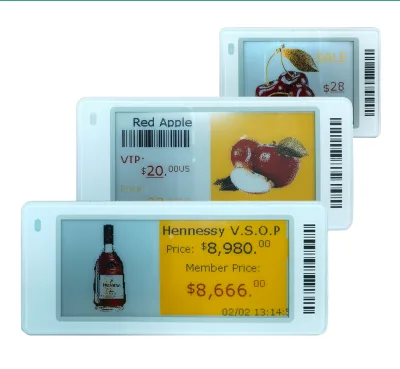
Compare 13 Android E Paper Display options from verified manufacturers in Guangdong, China. These devices support indoor retail applications with features like Zigbee or Bluetooth connectivity and battery life up to 5 years.
Key considerations
Products List




Comprehensive Sourcing Guide
Android E Paper Display Sourcing Guide
Sourcing Android-enabled electronic paper displays requires a nuanced understanding of the convergence between low-power bistable screen technology and full-featured mobile operating systems. Unlike traditional monochrome e-ink tags, these devices often serve as interactive retail signage, digital shelf labels with advanced connectivity, or portable information kiosks. The procurement process must balance the visual clarity and power efficiency of e-paper with the computational demands of an Android environment. Buyers must recognize that while the display technology itself is passive, the host system running Android introduces significant complexity regarding thermal management, battery life, and software integration.
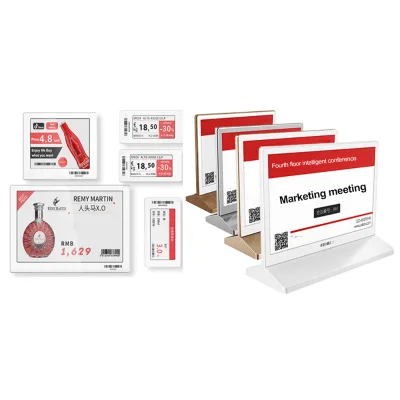
The market for these displays is fragmented, ranging from simple NFC-tagged price labels to complex 13.3-inch interactive screens. Procurement teams must first define the specific use case, whether it is for indoor retail environments, shopping malls, or supermarkets. The choice between a basic e-ink module and a full Android tablet form factor dictates the entire supply chain strategy, from component sourcing to final assembly. Understanding the distinction between pure e-paper modules and Android-integrated units is critical to avoiding specification mismatches and ensuring the final product meets operational requirements.
Product Scope and Observed Listing Signals
The current market landscape for Android e-paper displays includes a wide variety of form factors, with screen sizes ranging from small 1.54-inch modules to large 13.3-inch interactive panels. Listings often indicate support for multiple display technologies, including LCD, Color E-Ink, and standard E-Ink, which can create confusion regarding the actual visual output and power consumption. Buyers should carefully distinguish between devices that use e-paper for the screen and those that may use LCD or OLED technologies, as the latter do not offer the same bistable, low-power characteristics. The presence of Android operating system support suggests a higher level of computational capability, allowing for dynamic content updates and interactive features beyond static text.
Observed product attributes reveal a diversity in connectivity and power solutions. Some devices support advanced communication protocols such as 4G, Wi-Fi, Zigbee, and Bluetooth v4.2, enabling seamless integration into existing retail infrastructure. Power options vary significantly, with some units relying on coin-cell batteries like CR2450 or CR2500 for extended life, while others may require different power configurations. The operating temperature range is typically specified between 0°C and 40°C, which is suitable for most indoor commercial environments. Buyers must verify the specific battery life expectations, which can range from three to five years depending on the update frequency and screen technology used.
Technical Specifications to Verify
Resolution and pixel density are critical factors when evaluating Android e-paper displays, as they directly impact the readability of text and the clarity of graphical content. Specifications often cite resolutions such as 296x128 or 250x122 for smaller modules, while larger screens may offer higher pixel densities, such as 300 PPI, to ensure sharp image rendering. Buyers should verify the actual pixel layout and color capabilities, as some displays support only black and white, while others offer red, yellow, or six-gray scale options. The distinction between monochrome and color e-ink is particularly important for branding purposes, as color displays typically consume more power and may have slower refresh rates.
Connectivity and software integration capabilities must be rigorously tested before finalizing a procurement decision. The availability of an SDK (Software Development Kit) is a key indicator of how easily the display can be integrated into custom retail applications. Buyers should confirm the supported communication protocols, such as private encryption protocols or standard Zigbee, to ensure compatibility with existing store networks. Additionally, the operating system version and the ability to customize the user interface are essential for creating a seamless customer experience. Verification of the display type, whether it is a dot matrix or a full-color panel, is necessary to align technical expectations with marketing requirements.
Compliance and Safety Documentation
Environmental and operational safety standards are paramount for displays used in public retail spaces. Buyers must ensure that the devices meet relevant ingress protection ratings, such as IP65 or IP67, to withstand dust and moisture in various indoor environments. These ratings are particularly important for displays that may be exposed to cleaning agents or varying humidity levels. Compliance with electromagnetic compatibility (EMC) standards is also essential to prevent interference with other electronic devices in the store. Procurement teams should request test reports or certification documents that verify these safety and performance metrics.
Data security and privacy compliance are increasingly critical when dealing with Android-based devices that may handle customer interactions or transmit sensitive pricing data. Buyers should verify that the communication protocols used, such as Zigbee or Bluetooth, include encryption features to protect data integrity. The operating system should be up-to-date with the latest security patches to mitigate vulnerabilities. Additionally, compliance with regional electronic waste regulations and material safety standards, such as RoHS, should be confirmed to ensure responsible disposal and manufacturing practices. Documentation regarding the origin of materials and the manufacturing process can provide additional assurance of compliance.
Cost Drivers and Commercial Terms
The cost of Android e-paper displays is influenced by several factors, including screen size, resolution, and the complexity of the Android integration. Larger screens, such as 13.3-inch models, typically command higher prices due to the increased material and manufacturing costs. The inclusion of advanced features like color e-ink, 4G connectivity, or high-capacity batteries also contributes to the final price. Buyers should expect a wide range of pricing, from low-cost basic modules to premium interactive displays, and should align their budget with the specific functional requirements of their project.
Minimum order quantities (MOQ) and customization options are significant commercial considerations. Suppliers may offer MOQs ranging from single units for prototyping to thousands of units for large-scale deployments. Customization services, such as private mold development or specific branding, can add to the overall cost but may be necessary for brand consistency. Buyers should negotiate clear terms regarding warranty periods, typically one year, and after-sales support. Understanding the total cost of ownership, including software licensing and maintenance, is essential for accurate financial planning.
Supplier Qualification and Quality Control
Supplier qualification is a critical step in ensuring the reliability and consistency of Android e-paper displays. Buyers should prioritize suppliers who are original manufacturers, as they typically offer better control over quality and supply chain stability. Verification of the supplier’s production capabilities, including their ability to handle private molds and custom designs, is essential for projects requiring unique form factors. Requesting samples for rigorous testing is a standard practice to evaluate the actual performance of the display in real-world conditions.
Quality control processes should be clearly defined and agreed upon before production begins. Buyers should inquire about the supplier’s testing procedures, including burn-in tests, environmental stress testing, and software validation. The availability of detailed documentation, such as datasheets, photos, and EDA/CAD models, indicates a professional approach to product development. Establishing a clear communication channel for addressing defects or performance issues is crucial for maintaining operational continuity. Regular audits or third-party inspections may be necessary for large-volume orders to ensure consistent quality.
Long-Term Procurement Checks
Long-term procurement success depends on the supplier’s ability to provide ongoing software support and hardware updates. Android-based devices require regular security patches and feature updates to remain secure and functional. Buyers should confirm the supplier’s commitment to providing these updates over the product’s lifecycle. Additionally, the availability of spare parts and replacement components is essential for maintaining large deployments. Suppliers who offer comprehensive technical support and training can significantly reduce the operational burden on the buyer’s IT team.
Supply chain resilience and scalability are also key considerations for long-term procurement. Buyers should assess the supplier’s ability to scale production up or down based on market demand. Diversifying the supplier base or maintaining a relationship with multiple qualified vendors can mitigate the risk of supply disruptions. Regular review of performance metrics, such as defect rates and delivery times, helps identify potential issues early. By focusing on these long-term factors, buyers can ensure a sustainable and reliable supply of Android e-paper displays for their retail operations.
FAQs
What battery options are available for these displays?
The displays use either two CR2500 batteries or twelve CR2450 batteries depending on the model. Battery life ranges from three to five years under normal operating conditions. This ensures long-term operation without frequent replacements for retail applications.
Which screen sizes can be customized for this product?
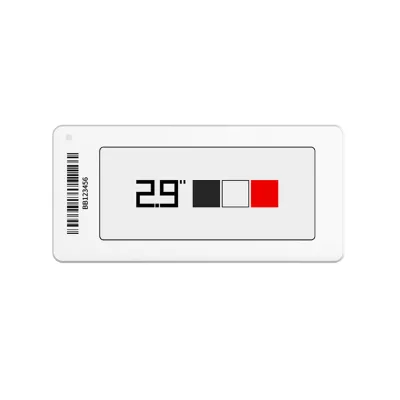
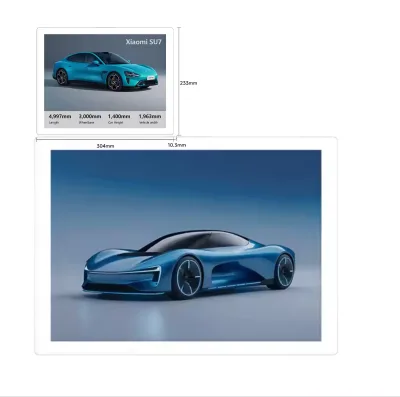
Customizable sizes include 1.54, 2.13, 2.66, 2.9, 4.2, 7.3, 10.2, 11.6, and 13.3 inches. The 13.3-inch model features a specific resolution ratio of 300 PPI. Buyers can select the exact dimension required for their retail store or shopping mall setup.
Can the display operate in indoor environments with specific conditions?
Yes, the device is designed specifically for indoor use within an operating temperature range of 0°C to 40°C. It supports IP67 and IP65 ratings for dust and water resistance. This makes it suitable for supermarkets and shopping malls with varying environmental conditions.
What communication protocols are supported by the electronic price tag?
The system supports Zigbee, a private encrypted protocol, or Bluetooth version 4.2 for connectivity. These protocols ensure secure and reliable data transmission for electronic price tags. The SDK function allows for further integration and customization of the communication layer.
How is the screen color and display mode configured?
The screen displays black, white, and red bistable colors using an electronic paper dot matrix. Some models offer LCD or color E-Ink display types with six gray levels. The appearance is typically white but supports rainbow customization for branding purposes.
What is the warranty period for the electronic price tag screen?
The product comes with a standard one-year warranty covering manufacturing defects. This warranty applies to the electronic price tag screen and its components. Buyers should verify specific terms with the original manufacturer in Guangdong, China for detailed coverage.
Which operating system runs the larger display models?
The larger display models, such as the 13.3-inch version, run on the Android operating system. This allows for flexible application development and media availability including datasheets and CAD models. The system supports English language and various retail use cases.