Source anti-flicker aio pc with keyboard and mouse for Business, Home, and Education
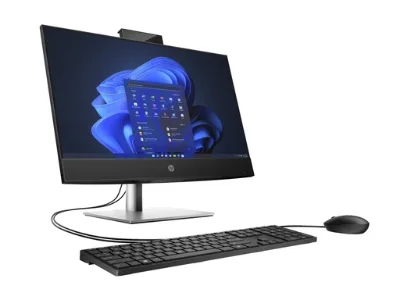
Compare 25 listings for an anti-flicker aio pc with keyboard and mouse featuring 1920x1080 resolution, Intel i5 processors, and 8GB RAM. These units support Windows 10 or 11 and are available in black or white finishes for various professional and personal needs.
Key considerations
Products List


Aio Computer Featuring Optional Camera, Touch Screen, Keyboard, and Mouse
$145.00 - $155.00
MOQ: 1 Pieces


Versatile Aio PC for Designers with Keyboard Mouse and Optional Camera
$140.00 - $150.00
MOQ: 1 Pieces

Aio Computer with Keyboard, Mouse, and Optional Touch Screen Functionality
$145.00 - $155.00
MOQ: 1 Pieces



Comprehensive Sourcing Guide
Strategic Sourcing Guide for Anti-Flicker All-in-One PCs with Peripherals
The global demand for integrated computing solutions has surged, driven by the need for space-efficient hardware in commercial and educational environments. Buyers searching for an "anti-flicker all-in-one PC with keyboard and mouse" are typically looking for a complete workstation that minimizes cable clutter while ensuring visual comfort and operational stability. This guide provides a disciplined approach to sourcing these units, focusing on verified technical attributes, compliance verification, and supply chain reliability. The objective is to equip procurement professionals with the knowledge to navigate the market without relying on unverified marketing claims or speculative data.
Technical Architecture and Display Specifications
The core of any all-in-one PC (AIO) procurement strategy lies in the display technology and the internal processing architecture. For applications requiring extended viewing hours, the "anti-flicker" attribute is paramount. While the specific technology used to achieve flicker-free performance (such as DC dimming) is often a proprietary implementation, buyers must verify that the panel specifications align with visual comfort standards. The supplied product data indicates a standard resolution of 1920×1080 pixels, which is the baseline for Full HD clarity. This resolution is available across screen sizes of 24, 27, and 32 inches, offering flexibility for different workspace configurations.
The panel style is identified as IPS (In-Plane Switching), a critical detail for procurement. IPS panels generally offer superior color accuracy and wider viewing angles compared to TN or VA panels, which is essential for collaborative environments or design work. The aspect ratio is consistently 16:9, ensuring compatibility with modern software and media content. When evaluating the "anti-flicker" claim, buyers should request specific test reports or technical datasheets that confirm the absence of PWM (Pulse Width Modulation) flickering at low brightness levels, as this is the primary cause of eye strain.
Regarding internal performance, the observed specifications point to a configuration suitable for business and student use. The central processing unit (CPU) is listed as Intel, specifically the i5 series, with a frequency of 3.0GHz or higher. This processing power is adequate for multitasking, document processing, and light multimedia consumption. Memory capacity is standardized at 8GB of DDR RAM, and storage is provided via a 256GB SSD. The inclusion of an SSD is a significant advantage over traditional hard drives, offering faster boot times and application loading speeds. The operating system is compatible with Windows 10 and Windows 11, ensuring long-term software support and security updates.
Peripheral Integration and Connectivity Ecosystem
A defining feature of the target keyword is the inclusion of a keyboard and mouse. The product attributes confirm that accessories, specifically a keyboard and mouse, are included in the standard package. The keyboard type is described as a standard layout, which implies a full-sized QWERTY configuration suitable for data entry and general computing tasks. The connectivity options are robust, supporting Wi-Fi, USB 3.0, HDMI, Ethernet, and Bluetooth. This diverse interface portfolio allows the AIO to function as a standalone unit while maintaining seamless integration with external networks and peripherals.
The inclusion of a DVD-ROM drive in some configurations suggests support for legacy media, though the primary storage relies on the 256GB SSD. For buyers requiring specific connectivity, the presence of USB 3.0 and Ethernet ensures high-speed data transfer and stable wired network connections, which are critical for business environments where Wi-Fi reliability can be variable. The camera is listed as optional, meaning procurement teams must explicitly verify if a webcam is included in the specific SKU they are purchasing, as this feature is not guaranteed across all units.
Compliance, Certification, and Origin Verification
When sourcing electronics from international markets, particularly from regions like Shunde, Guangdong, China, verifying compliance is a non-negotiable step. The supplied context mentions CE and ROHS certifications as background information. However, buyers must treat these as potential attributes rather than guaranteed facts for every unit. The CE mark indicates conformity with health, safety, and environmental protection standards for products sold within the European Economic Area, while ROHS restricts the use of specific hazardous materials.
To ensure compliance, procurement teams should request current test reports from the supplier that correspond to the specific batch being ordered. Relying on a supplier's general claim of certification without verifying the validity of the certificate against the product serial number or batch code can lead to regulatory issues. The product origin is consistently listed as Guangdong, China, specifically Shunde. This region is a known manufacturing hub for electronics, but the specific factory location and its audit status should be confirmed. Buyers should also verify the "products status" as "New" to avoid purchasing refurbished or open-box items that may not carry the same warranty protections.
Cost Drivers and Pricing Dynamics
The observed price range for these units spans from $118 to $986 USD. This wide variance indicates that the final cost is heavily influenced by specific configuration choices, order volume, and the level of customization required. Several factors drive these costs:
- Screen Size: The jump from 24 inches to 32 inches significantly impacts the panel cost.
- Processor and Memory: While the base model features an i5 CPU and 8GB RAM, upgrades to higher core counts or larger RAM capacities will increase the unit price.
- Customization: The product attributes list "Customization: Available." This allows for branding, pre-installed software, or specific hardware modifications, which adds to the manufacturing complexity and cost.
- MOQ (Minimum Order Quantity): The observed MOQ ranges from 1 to 20 units. Smaller orders often carry a higher per-unit cost due to setup fees, while bulk orders may benefit from economies of scale.
Buyers should analyze the total cost of ownership rather than just the unit price. A lower-priced unit might lack essential features like a built-in camera or specific connectivity ports, necessitating additional purchases later. Conversely, a higher-priced unit with a 32-inch IPS panel and full customization might offer better value for a corporate training center.
Supplier Evaluation and Quality Assurance
Selecting a supplier for AIO PCs requires a rigorous evaluation process. The "brand name" is listed as OEM, indicating that these units are manufactured for other brands or for private labeling. This presents an opportunity for buyers to create their own branded products but requires a high degree of trust in the manufacturer's quality control processes. The "private mold" attribute is listed as "No," suggesting that the physical design is a standard model available to multiple buyers. This can be advantageous for ensuring parts availability and repairability but limits unique aesthetic differentiation.
Quality control should focus on the manufacturing process and the final product status. The "processor brand" is noted as "customized," which may imply that the CPU is sourced and integrated by the manufacturer rather than being a standard retail SKU. Buyers should verify the sourcing of critical components like the SSD and RAM to ensure they are from reputable manufacturers. The warranty is specified as 1-Year, which is a standard industry term. However, the "After-sales Service" includes a Call Center and online technical support, which is a critical differentiator. Buyers must test the responsiveness of this support channel before finalizing a contract.
Typical Applications and Use Cases
The product attributes explicitly categorize the use case as "Business" and "For Home & Student." This dual positioning suggests versatility. In a business context, the AIO's compact design and anti-flicker display make it ideal for reception desks, conference rooms, and office workstations where space is at a premium. The inclusion of a standard keyboard and mouse ensures immediate usability without the need for additional peripheral procurement.
For the education sector, the 1920×1080 resolution and IPS panel provide a clear viewing experience for students in computer labs. The 24-inch size is particularly suitable for individual student stations, while the 27 or 32-inch models can serve as instructor demonstration units. The "widescreen" feature and 16:9 ratio ensure that educational software and web-based learning platforms render correctly. The "feature" attribute is listed as "other," which is vague; buyers should clarify if this includes specific educational software pre-instations or specialized hardware features like touch capabilities, though the standard description does not confirm touch functionality.
Long-Term Procurement and Maintenance Considerations
Sourcing AIO PCs is not just a one-time transaction but a long-term commitment. The "products status" is "New," but the longevity of the device depends on the build quality and the availability of spare parts. The "interface" is listed as "standard," which is a positive indicator for compatibility with future peripherals. However, buyers should inquire about the availability of replacement parts, such as power adapters, keyboards, and mice, as these are common points of failure.
The "RAM type" is DDR, and the "hard drive type" is SSD. These are modern standards that ensure a reasonable lifespan, but buyers should verify the endurance rating of the SSD, especially for high-write environments like schools or busy offices. The "warranty" of 1-Year is a baseline; buyers should negotiate extended warranty terms or service level agreements (SLAs) if the deployment involves hundreds of units. The "place of origin" being Guangdong, China, means that logistics and lead times must be carefully managed. While the "lead time" is not explicitly provided in the facts, the MOQ range suggests that production can be scaled, but buyers should confirm the specific timeline for their order volume to avoid supply chain disruptions.
In conclusion, sourcing an anti-flicker all-in-one PC with keyboard and mouse requires a balance of technical verification, compliance checks, and strategic supplier selection. By focusing on the verified attributes of IPS panels, Intel i5 processors, and standard connectivity, buyers can ensure they acquire reliable hardware. The wide price range and customization options offer flexibility, but they also demand careful evaluation to align the final product with specific operational needs. Through diligent due diligence and a focus on long-term support, procurement teams can secure AIO solutions that enhance productivity and visual comfort across business and educational settings.
FAQs
What display resolution and panel type does this AIO PC use?
The unit features a 1920×1080 resolution with an IPS panel style. This configuration ensures wide viewing angles and accurate color reproduction suitable for business and educational environments requiring visual comfort.
Which internal components are included in the standard configuration?
Standard units include an Intel i5 processor, 8GB DDR RAM, and a 256GB SSD. The system runs on Windows 10 or Windows 11 and supports connectivity via Wi-Fi, Bluetooth, and Ethernet ports.
Can I purchase this all-in-one PC with a keyboard and mouse?
Yes, the package includes a standard keyboard and mouse as standard accessories. These peripherals are integrated to provide a complete workstation solution without the need for additional cable management or separate purchases.
What screen sizes are available for this anti-flicker all-in-one PC?
The device is available in 24, 27, and 32-inch screen sizes. These options allow buyers to select the optimal display dimension for specific workspace requirements, ranging from compact desks to larger conference areas.
How is the warranty and after-sales service structured for this product?
The product comes with a 1-year warranty and includes call center plus online technical support. Buyers should verify the specific support channels available for their region before finalizing bulk procurement orders.
What is the minimum order quantity for sourcing these units?
The minimum order quantity ranges from 1 to 20 units depending on the supplier. Smaller orders may incur higher per-unit costs, while larger volumes typically benefit from economies of scale and customization options.