Source DDR RAM for Servers, Laptops, and Desktops
Find 30 verified DDR RAM options for servers, laptops, and desktops. Buyers can compare specifications like capacity, frequency, and voltage to select the right memory for their specific computing needs.
Key considerations
Products List


4GB/8GB/16GB DDR4 2400MHz PC4-19200 1.2V Desktop Computer Memory RAM DDR
$30.00 - $105.70
MOQ: 50 Pieces
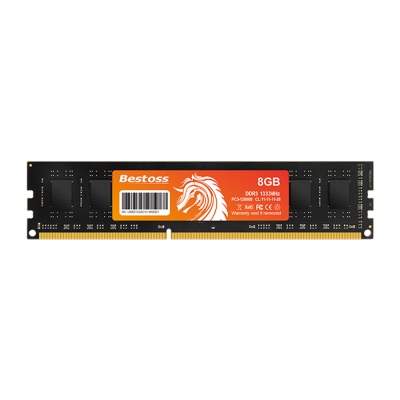


RAM DDR5 32GB (16GBX2) 6000MHz 6400MHz DDR5 6400MHz Desktop Computer Memoria RAM
$335.00 - $359.00
MOQ: 1 Pieces


Comprehensive Sourcing Guide
DDR RAM Sourcing Guide
Selecting the right DDR RAM modules requires a disciplined approach that balances technical compatibility with commercial reliability. Buyers must navigate a complex landscape of memory types, form factors, and performance metrics to ensure seamless integration into their target hardware. This guide provides evidence-based procurement strategies for sourcing DDR RAM, focusing on verification steps, technical due diligence, and supplier evaluation. By adhering to these structured guidelines, procurement teams can mitigate risks associated with incompatible components, supply chain disruptions, and quality inconsistencies.
The following sections outline the critical dimensions of DDR RAM sourcing, from understanding product scope to establishing long-term quality controls. Each section is designed to help buyers make informed decisions based on observable listing signals, technical specifications, and commercial terms. The goal is to provide a comprehensive framework that supports efficient procurement while maintaining high standards of performance and reliability.
Product Scope and Observed Listing Signals
The DDR RAM market encompasses a wide variety of modules tailored for different computing environments, including servers, laptops, and desktops. Observed listings indicate a diverse range of product attributes, such as DIMM and SO-DIMM form factors, with pin counts like 240 pins being common for specific generations. Buyers should note that applications vary significantly, with some modules designed for high-performance server environments requiring error correction, while others are optimized for cost-effective laptop or desktop use. Understanding these distinctions is crucial for aligning procurement with specific hardware requirements.
Listing signals also reveal variations in physical characteristics and packaging. Products may feature cooling fins for thermal management in high-load scenarios, with colors ranging from black to green PCBs. Packaging options include standard shipping packaging, blister packages, or customized solutions, which can impact logistics and handling. Buyers should verify these details against their operational needs, as factors like weight, size, and cooling requirements can influence system design and assembly processes.
Technical Specifications to Verify
Technical verification is paramount when sourcing DDR RAM, as compatibility issues can lead to system failures or performance bottlenecks. Buyers must confirm key specifications such as memory type, frequency, and operating voltage. For instance, some modules operate at 1.2V or 1.35V/1.5V, while others may support 1.1V, depending on the generation and application. Frequency ratings, such as 1333MHz or 2400MHz, directly impact data transfer speeds and must match the motherboard’s capabilities. Additionally, capacity options like 4GB, 8GB, or 16GB should be selected based on workload demands.
Performance metrics and physical dimensions are equally critical for ensuring proper fit and function. Buyers should check random read/write speeds, average access times, and operating temperature ranges, which typically span from 0°C to 85°C. Physical size specifications, such as 133.35x31.25x2mm for certain DIMMs, must align with chassis constraints. Furthermore, features like automatic error correction are essential for server applications, whereas standard performance modules may suffice for general computing tasks. Verifying these details prevents mismatches and ensures optimal system stability.
Compliance and Safety Documentation
Compliance and safety documentation are essential for ensuring that DDR RAM modules meet industry standards and regulatory requirements. Buyers should request evidence of adherence to standard specifications, which may include customized or standard configurations depending on the supplier’s capabilities. Documentation should confirm that products are manufactured in facilities that follow recognized quality management practices, although specific certifications should be verified on a case-by-case basis. This step is crucial for mitigating risks associated with non-compliant or substandard components.
Safety considerations also extend to the operational parameters of the memory modules. Buyers must ensure that products are designed to operate within specified voltage and temperature ranges to prevent overheating or electrical failures. Documentation should include details on operating voltage, such as 1.2V or 1.5V, and temperature limits, typically up to 85°C. Additionally, buyers should verify that packaging and shipping methods comply with international regulations, especially when sourcing from regions like Beijing, China, to ensure safe and efficient delivery.
Cost Drivers and Commercial Terms
Cost drivers in DDR RAM procurement include factors such as memory capacity, performance features, and customization options. Modules with higher capacities, such as 16GB, or advanced features like error correction, may command higher prices. Buyers should also consider the impact of cooling fins and specialized packaging on overall costs. Understanding these variables helps in budgeting accurately and negotiating favorable terms with suppliers. It is essential to balance cost with performance to achieve the best value for specific applications.
Commercial terms, including minimum order quantities (MOQ), lead times, and payment methods, significantly influence procurement strategies. Observed MOQs can range from 1 to 1000 pieces, with lead times varying based on order size, such as 3-5 days for orders below 1K units. Payment methods like T/T, Western Union, or PayPal offer flexibility, but buyers should establish clear agreements on shipping terms, which may include DHL, UPS, or FedEx. Clarifying these terms upfront prevents misunderstandings and ensures smooth transaction processes.
Supplier Qualification and Quality Control
Supplier qualification is a critical step in ensuring the reliability and consistency of DDR RAM supplies. Buyers should assess suppliers based on their ability to provide customized products, adhere to standard specifications, and maintain consistent quality across batches. Verification of manufacturing origins, such as Beijing, China, can provide insights into the supplier’s production capabilities and logistical efficiency. Additionally, buyers should evaluate the supplier’s track record in meeting lead times and handling customized orders, as these factors impact supply chain resilience.
Quality control measures should be integrated into the procurement process to minimize defects and ensure product performance. Buyers should request samples for testing before committing to large orders, focusing on key metrics like random read/write speeds and operating temperatures. Establishing clear quality standards and inspection protocols helps in identifying potential issues early. Furthermore, maintaining open communication with suppliers regarding any deviations from specifications ensures that corrective actions can be taken promptly, safeguarding the integrity of the final product.
Long-Term Procurement Checks
Long-term procurement checks involve continuous monitoring of supplier performance and product quality to maintain operational efficiency. Buyers should establish regular review cycles to assess supplier adherence to agreed-upon standards, including lead times, packaging quality, and product specifications. This proactive approach helps in identifying trends or issues that may affect supply chain stability. By maintaining a robust evaluation framework, buyers can ensure that their DDR RAM supplies remain consistent and reliable over time.
Additionally, buyers should stay informed about advancements in DDR technology and market trends to make informed decisions about future procurements. This includes monitoring changes in memory types, frequencies, and performance capabilities. Engaging with suppliers to discuss potential upgrades or customizations can also help in optimizing procurement strategies. By combining continuous monitoring with strategic planning, buyers can enhance their sourcing efficiency and maintain a competitive edge in their respective markets.
FAQs
What memory types are available for server applications?
Server applications can utilize DDR3 and DDR4 RAM modules. Specific models include 4GB and 8GB capacities with operating voltages ranging from 1.1V to 1.5V. These units often feature standard specifications or customized options to meet diverse hardware requirements.
Can I find DDR RAM with automatic error correction?
Yes, certain DDR RAM products offer automatic error correction performance. These modules typically operate at frequencies like 1333MHz and include cooling fins for thermal management. They are designed for stable operation in demanding server environments.
What are the lead times for orders under 1000 pieces?
Orders below 1000 pieces generally have a lead time of 3 to 5 days. For quantities exceeding this threshold, lead times must be confirmed directly with the supplier. This ensures timely delivery based on current production capacity.
Which DDR RAM models support customized packaging?
Customized packaging is available for various DDR RAM models alongside standard shipping options. Products may come in blister packages or other customized forms depending on buyer needs. This flexibility supports different logistics and storage requirements.
How do I identify DDR RAM with specific physical dimensions?
DDR RAM modules come in various sizes, such as 133.35x31.25x2mm or 67.72x30.12x2.99mm. Selecting the correct size depends on the target device, whether it is a server, laptop, or desktop. Always verify dimensions against hardware specifications.
What is the minimum order quantity for DDR RAM?
The minimum order quantity can range from 1 to 1000 pieces depending on the specific product. Some listings specify an MOQ of 100 pieces for certain models. Buyers should check individual product details to confirm exact requirements.
Can DDR RAM operate at different voltage levels?
Yes, DDR RAM can operate at various voltage levels including 1.1V, 1.2V, 1.35V, and 1.5V. The specific voltage depends on the memory type and model, such as DDR3 or DDR4. Ensure compatibility with the system motherboard before purchase.