Source HDMI Adapter for HDTV, Computer, and Projector
Find 30 HDMI Adapter options from Shenzhen suppliers with features like 4K support, HDMI-compatible connections, and various packing types. Compare models such as EL-H102 and KWDL-043 to find the right solution for HDTV, computer, or projector applications.
Key considerations
Products List




Comprehensive Sourcing Guide
Strategic Sourcing Guide for HDMI Adapter Procurement
The global demand for high-definition connectivity solutions has positioned the HDMI Adapter as a critical component in modern B2B supply chains. Whether for consumer electronics, industrial control systems, or multimedia installations, the procurement of these adapters requires a disciplined approach to ensure compatibility, safety, and cost-efficiency. This guide synthesizes observed market data and technical realities to provide a framework for sourcing HDMI adapters, focusing on the specific attributes and constraints identified in current product listings.
Technical Specifications and Interface Standards
When evaluating HDMI adapters, the primary focus must be on the specific interface standards and signal capabilities required for the intended application. The market offers a diverse range of models, each designed to bridge different connectivity gaps. Observed product data indicates a variety of specific model numbers, including EL-H102, EL-H108, EL-H112, EL-A307, CH40194, and AD102, alongside generic descriptions like "HDMI Adapter" and "TYPE C HDMI Adapter." These identifiers often correlate with specific form factors or internal circuitry.
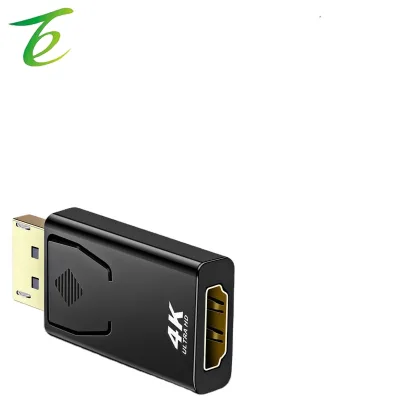
A critical technical distinction lies in the input and output signal types. While the core keyword is "HDMI Adapter," the actual signal flow varies. Some units function as direct pass-throughs, while others convert signals. For instance, certain listings specify an "Output" of "Component signal," indicating a conversion from HDMI to component video, which is essential for legacy display integration. Conversely, other models are explicitly defined as "4K Dp to HDMI Adapter," utilizing a "Displayport" connector (Connector 1) to drive HDMI displays. This distinction is vital; a buyer seeking to connect a modern laptop with a DisplayPort output to an older projector requires a specific active converter, not a passive cable.
The physical connection types also vary significantly. The "Connector" attribute lists "RCA" for some units, suggesting hybrid adapters that combine HDMI inputs with traditional analog outputs. Other configurations feature "Male-Female" gender arrangements, which dictate how the adapter plugs into source and destination devices. Furthermore, the "Connection" attribute notes "HDMI-Compatible" for several items, implying adherence to the HDMI standard but potentially requiring verification of the specific version (e.g., 1.4, 2.0, or 2.1) to ensure bandwidth support for high-resolution content.
Compliance and Certification Verification
In the B2B sector, regulatory compliance is not merely a formality but a prerequisite for market access and liability protection. The supply chain for HDMI adapters is heavily regulated due to the electronic components involved and the electrical safety requirements. Buyers must rigorously verify that suppliers can provide documentation for recognized standards.
Observed product attributes list a robust set of certifications, including "RoHS," "CE," "CCC," "UL," "ISOCCS," "CSA," and "VDE." These certifications address different regional and safety concerns. RoHS (Restriction of Hazardous Substances) is a global baseline for restricting lead and other hazardous materials. CE marking indicates conformity with health, safety, and environmental protection standards for products sold within the European Economic Area. UL and CSA are critical for North American markets, ensuring electrical safety and fire resistance. The presence of "ISO9001" in the product standard list suggests that the manufacturer maintains a quality management system, which is a strong indicator of process consistency.
However, buyers must exercise caution. While "RoHS Complaince" (noting the spelling variation in source data) and "Rohs, PAHs" are listed as standards, these should be treated as claims that require independent verification through test reports. The "Environment Standard" of "RoHS Complaince" must be backed by a valid certificate of compliance. Similarly, the "CCC" (China Compulsory Certification) is mandatory for many electronic products sold in China. A responsible procurement strategy involves requesting current, dated certificates for each specific model number, as certifications can be model-specific and may expire or be revoked.
Cost Drivers and Pricing Dynamics
Understanding the cost structure of HDMI adapters is essential for budgeting and negotiating. The observed market data reveals a wide price range, spanning from $0.10 to $300.00 USD. This significant variance is not arbitrary but is driven by several key factors: technical complexity, build quality, and volume.
At the lower end of the spectrum, products priced near $0.10 are likely simple passive cables or basic adapters with minimal shielding and standard copper conductors. The "Wire Core Material" is identified as "Bare Copper Wire," which is a standard, cost-effective choice. However, as the price increases, the value proposition shifts toward active conversion chips, higher-grade shielding, and more durable housing materials. The "4K Dp to HDMI Adapter" category, for example, likely commands a higher price due to the active electronics required to translate the DisplayPort signal.
Volume is another primary cost driver. The observed "MOQ" (Minimum Order Quantity) ranges from 1 to 1000 units. Suppliers often offer tiered pricing, where the unit cost decreases significantly as the order volume approaches the higher end of the MOQ spectrum. The "Price" attribute is listed as "Ex-Works," meaning the quoted price covers the cost of goods at the factory gate but excludes shipping, insurance, and duties. Buyers must calculate the total landed cost by adding freight charges, which are influenced by the "Transportation" method (Sea or Air) and the weight of the shipment. The "Standard" attribute lists weights such as "40g" and "0.5KG," which directly impact shipping costs. A 0.5kg unit shipped via air will have a substantially different freight cost compared to a 40g unit, affecting the overall unit economics.
Typical Applications and Use Cases
The versatility of HDMI adapters is reflected in their diverse application profiles. The "Application" attribute lists a broad spectrum of use cases, including "HDTV," "Computer," "Projector," "Home Appliance," "Multimedia," "Microphone," "Telephone," "Monitor," "iPod," "Speaker," "DVD Player," and "Game Player." This wide range indicates that these adapters are not limited to a single industry but serve as universal connectivity solutions.
In the consumer electronics sector, adapters are frequently used to connect gaming consoles or media players to modern televisions that may lack legacy inputs. The "Application" for "Home Appliance" suggests integration into smart home devices or kitchen displays. In the professional AV (Audio-Visual) market, the "Projector" and "Monitor" applications are dominant, where adapters facilitate presentations from laptops with non-standard ports to conference room displays. The "4K Dp to HDMI Adapter" is particularly relevant for professional workstations and high-end gaming setups where DisplayPort is the native output.
The "Type" attribute, such as "Twisted Pair," indicates specific internal wiring designed to reduce electromagnetic interference (EMI), which is crucial for maintaining signal integrity in high-bandwidth applications like 4K video transmission. The "360 Degree Rotation Type HDMI Adapter" highlights a design feature aimed at ergonomic flexibility, allowing users to plug the adapter into tight spaces without straining the cable. These application-specific features must be matched to the end-user environment to ensure optimal performance.
Supplier Evaluation and Operational Logistics
Selecting the right supplier involves more than just comparing unit prices; it requires an assessment of operational capabilities and logistical reliability. The "prod_origin" is consistently listed as "Shenzhen" or "China," reflecting the concentration of the electronics manufacturing hub in this region. Shenzhen is known for its rapid prototyping and supply chain efficiency, but buyers must verify the specific factory's capacity and reputation.
The "Customization" attribute is marked as "Available," indicating that many suppliers offer OEM (Original Equipment Manufacturer) and ODM (Original Design Manufacturer) services. The "OEM" attribute is explicitly listed as "Accepted," meaning buyers can request branding, packaging, or minor design modifications. This is a significant advantage for companies looking to white-label products or create custom solutions for specific clients. However, customization often increases the MOQ and lead time, so buyers should clarify these terms early in the negotiation.
Logistics are managed through specific "Shipping Term" and "Transportation" protocols. The "Shipping Term" is noted as "Fob" (Free on Board), which means the supplier is responsible for delivering the goods to the port of shipment, after which the buyer assumes responsibility for freight and insurance. The "Transportation" options include "by Sea or Air," allowing buyers to balance cost against speed. Sea freight is generally more economical for large volumes, while air freight is suitable for urgent, smaller orders. The "Package" attributes vary from "Ppbag" and "Bag" to "Colour Box," "Clamshell Packing," and "Gift Box." The choice of packaging affects both the retail presentation and the protection of the goods during transit.
Quality Control and Long-Term Procurement
Ensuring long-term quality requires a proactive approach to quality control (QC) and supplier relationship management. The "prod_packing" methods, such as "PE Bag, Blister and Carton" or "PE Bag and Carton," suggest varying levels of protection. For high-volume orders, buyers should specify packaging standards that prevent damage during shipping, especially for delicate connectors and internal circuitry.
The "Material Shape" of "Round Wire" and the "Wire Core Material" of "Bare Copper Wire" are standard specifications, but buyers should verify the gauge and plating of the copper to ensure durability and conductivity. The "Standard" of "Support 4K 1080p" is a performance claim that must be validated through testing. Buyers should request sample units for performance testing before committing to large orders, specifically checking for signal dropouts, resolution support, and physical durability of the connectors.
Long-term procurement considerations include the stability of the supply chain and the ability to scale. With an "Actual product count" of 30 observed models, the market is dynamic, but buyers should ensure that the specific models they select have a stable production lifecycle to avoid obsolescence. The "Certification" requirements, such as "RoHS,CE,CCC,UL,ISOCCS,CSA,VDE," should be maintained throughout the production run, not just at the initial sample stage. Regular audits and third-party testing can help maintain these standards.
Comparative Analysis of Adapter Features
To facilitate decision-making, the following table summarizes key observed attributes across different product categories found in the market data. This comparison highlights the diversity in specifications and helps buyers identify the right fit for their needs.
| Feature Category | Passive/Basic Adapter | Active/Converter Adapter | Specialized/High-End Adapter |
|---|---|---|---|
| Typical Models | EL-H102, EL-H108 | EL-H112, AD102, KWDL-043 | 4K Dp to HDMI, TYPE C HDMI |
| Connector Type | HDMI Male-Female | Displayport to HDMI | USB-C to DVI, HDMI to Component |
| Signal Output | HDMI Signal | Component Signal, 4K | 4K 1080p Support |
| Packaging | Ppbag, Bag | Colour Box, Clamshell | Gift Box, Printing Polybag |
| Certifications | RoHS, CE | RoHS, CE, CCC, UL | RoHS, PAHs, ISO9001 |
| Price Range | $0.10 - $5.00 | $10.00 - $50.00 | $50.00 - $300.00 |
| MOQ Range | 1 - 100 | 100 - 500 | 500 - 1000 |
This table illustrates that while basic adapters are inexpensive and widely available, specialized converters require higher investment and stricter quality checks. The "Standard" of "40g" versus "0.5KG" also reflects the weight difference between simple cables and complex active units, influencing shipping logistics.
Conclusion
Sourcing HDMI adapters requires a balanced approach that weighs technical specifications, regulatory compliance, and logistical factors. The market offers a vast array of options, from simple passive cables to complex active converters supporting 4K resolution and multiple input standards. Buyers must carefully verify certifications like RoHS, CE, and UL, as these are critical for market access and safety. Understanding the cost drivers, such as the Ex-Works pricing and volume-based MOQs, allows for accurate budgeting. By leveraging the available customization options and maintaining rigorous quality control, procurement teams can secure reliable supply chains that meet the diverse needs of modern electronic applications. The key to success lies in matching the specific model attributes to the end-user requirements while ensuring all compliance and logistical parameters are clearly defined and verified.
FAQs
What certifications are available for hdmi adapters?
Available certifications include RoHS, CE, CCC, UL, ISOCCS, CSA, and VDE. These ensure compliance with safety and environmental standards for global markets, though specific model verification is required.
Which product models are available for hdmi adapters?
Common models include EL-H102, EL-H108, EL-H112, EL-A307, CH40194, and AD102. Generic descriptions like TYPE C HDMI Adapter and DVI are also listed alongside specific model identifiers.
Can hdmi adapters support 4K resolution?
Yes, certain models support 4K resolution alongside 1080p. Specific adapters like the 4K Dp to HDMI Adapter utilize DisplayPort connectors to drive high-resolution HDMI displays effectively.
How is customization handled for hdmi adapters?
Customization is available with OEM services accepted by suppliers. Buyers can request branding or packaging modifications, though this may affect minimum order quantities and lead times.
What are the typical shipping terms for hdmi adapters?
The standard shipping term is FOB (Free on Board). Transportation is available by sea or air, with prices quoted as Ex-Works, excluding freight and insurance costs.
Which materials are used in HDMI Adapter construction?
Wire core material is typically bare copper wire with a round wire shape. Some units feature twisted pair types to reduce electromagnetic interference during signal transmission.
What is the price range for hdmi adapters?
The observed price range spans from 0.1 to 300 USD. Costs vary based on technical complexity, build quality, and volume, with unit prices often decreasing at higher order quantities.